When the WAN stays up but the internet doesn't ...
My house has two routers and three ISPs. That is supposed to mean I never
notice an outage. For years it mostly worked, because the failure modes I had
designed for were the honest ones: the fibre gets unplugged, the ONT dies, the
DHCP lease expires. The interface goes down, the default route disappears, FRR
withdraws it, and everything quietly moves to the other router.
I've always wanted to cater for failing in the dishonest way instead. The link stays up. The
DHCP lease renews happily. The kernel default route sits there looking
perfectly healthy. And nothing reaches the internet.
Every failover mechanism I had was watching the wrong thing. Link state: up.
Route present: yes. BGP session: established. So nothing failed over, and the
entire house could sit there timing out while a perfectly good second ISP idled
a few RU away ...
This is about what I built to catch that. The IPv4 half is unremarkable —
keepalived has solved that for twenty years. The IPv6 half is the part almost
every failover setup I can find skips, gets half-right, or quietly leaves
broken, and it is the part that has only really become practical to do
properly in the last few years as OS support caught up.
The setup
              Internet                              Internet
                 |                                     |
          +------+------+                    +---------+---------+
          |    AT&T     |                    |      Astound      |
          |             |                    |  (+ HE 6in4 for   |
          |             |                    |   v6, T-Mobile as |
          |             |                    |   last resort)    |
          +------+------+                    +---------+---------+
                 | att                                 | astound
                 |                                     |
   +-------------+-----------+          +--------------+----------+
   |         home1           |          |         home2           |
   |  VRRP prio 100  MASTER  |          |  VRRP prio 69   BACKUP  |
   |  RA RouterPreference=hi |          |  RA RouterPreference=lo |
   |  AS 65069               |          |  AS 65070               |
   +------------+------------+          +------------+------------+
                |                                    |
                |   BGP 65069 <-> 65070              |  each router offers
                |   over the LAN segment             |  the other its default
                |                                    |
   =============+====================================+=============
                     vlan69   10.6.9.0/24, fd00:1::/64
                                   |
                          +--------+--------+
                          |   LAN clients   |
                          +-----------------+
Two routers on one LAN. keepalived holds a VRRP virtual IP that clients use as
their IPv4 gateway. Both routers send IPv6 Router Advertisements, home1 at
RouterPreference=high and home2 at low, so clients prefer home1 while it is
advertising. FRR exchanges default routes between them over BGP, with each
router preferring its own uplink because a live kernel route is administrative
distance 0 and eBGP is 20.
All of that works beautifully — for failures where something actually
disappears.
Three switches
The daemon I ended up with routes nothing itself. That turned out to be the
important design decision: it just probes the WAN and, when it has been
unusable for long enough, flips three switches so that keepalived and
systemd-networkd move the traffic.
  stop + deprecate home1's RAs   ->  clients' IPv6 default router moves to home2
  write 1 to a keepalived file   ->  VRRP 100 - 42 = 58 < 69, so home2 takes the VIP
Probing is ping -c 3 at Cloudflare and Google, over both address families,
pinned to the WAN interface with ping -I att. That pinning matters more than
it looks: after a failover the default route no longer points at AT&T, so
unpinned probes would start testing the backup path and cheerfully report
that everything is fine forever.
Hysteresis is deliberately lopsided — six consecutive bad rounds (about 30
seconds) to fail over, sixty good ones (about five minutes) to come back.
Failing over quickly is cheap. Flapping is not.
Judging the verdict per address family
My first version took a majority vote across all four probe targets. That
looked reasonable and was quietly useless, which I only noticed while writing
the docs.
The targets split evenly: two IPv4, two IPv6. So if AT&T's IPv6 broke while
IPv4 kept working — a real and not especially rare failure — exactly half the
targets failed. A majority rule sits right on that boundary and never trips.
The one case where IPv6 failover is the entire point is the one case it could
not see.
Now each family is judged separately: a family is down when all of its targets
fail, and the round is unhealthy if either family is down. A single provider
having a bad day still cannot trip anything, because the other provider answers
in both families.
The IPv6 half: the part everyone skips
Moving the IPv4 gateway is easy and thoroughly solved: keepalived watches a
file, I write a 1 to it, the priority drops below the backup's, the VIP
moves. Done. There is a single virtual address, exactly one router answers for
it at a time, and clients never know anything happened.
IPv6 has no equivalent in common use. Clients do not point at a virtual
address; they choose a default router from Router Advertisements, and they
choose a source address from prefixes those advertisements carry. There are
two moving parts, not one.
Nearly every dual-WAN or dual-router writeup I can find handles the first and
ignores the second — if it mentions IPv6 at all. Plenty of otherwise careful
setups run VRRP for IPv4 and just... let IPv6 do whatever it does, which in a
degraded-WAN scenario means clients keep using a router whose uplink is dead,
because nothing ever told them otherwise.
And the ones that do move the default router usually stop there, which is
only half the job. Withdraw yourself as a router and clients dutifully switch
their next hop — while still sourcing packets from an address in the prefix
your dead WAN delegated. The traffic leaves via the backup with a source
address the backup has no business using, and depending on your NAT and your
ISP's filtering, it either silently breaks or works by accident.
So to move an IPv6 client properly you need three things, and they are three
different standards:
| what | RFC | what it does |
|---|---|---|
| Router Preference (high/low) | 4191 | steers clients to the primary while it is healthy |
| Router lifetime 0 | 4861 | withdraws the router immediately, not after the lifetime expires |
| Preferred lifetime 0 on the prefix | 4862 | deprecates the address, so clients stop sourcing from it |
Why this is practical now and wasn't
None of those RFCs are new — 4191 is from 2005. What has changed is that in
2026 you can actually rely on client operating systems implementing all three
correctly and consistently. Router Preference in particular used to be a
coin-flip: widely specified, patchily honoured, off by default in places. The
same went for how promptly stacks acted on a deprecated prefix in source
address selection.
That is no longer true across anything I have in the house — macOS, Linux,
Windows, phones. Preference steering works, lifetime-0 withdrawal is acted on
in seconds, and a deprecated prefix genuinely pushes source selection
elsewhere. That reliability is the whole reason this approach is worth
building on rather than reaching for something more exotic.
So to move them, home1 has to stop advertising.
My first attempt was an nftables rule dropping outbound RAs. Clean, instant,
reversible — and a one-way door, which I discovered only because I checked the
wire instead of the logs.
Dropping a packet in nftables' OUTPUT hook returns EPERM to the sending
socket. systemd-networkd's sd-radv gets that error and stops its RA timer
permanently. It never resumes when you remove the rule. It logs nothing at
all.
So failover worked perfectly. Failback silently did not. IPv4 came back —
keepalived is independent — while every IPv6 client stayed on the backup
router indefinitely, and nothing anywhere said so. The tell, once I went
looking, was the rule's packet counter sitting at 7 across eight minutes of
blocking, when it should have been dozens. networkd had given up after a couple
of failures.
The fix was to stop fighting networkd and ask it nicely: drop an
IPv6SendRA=no file into its drop-in directory and run networkctl reload && networkctl reconfigure. It stops on purpose, and as a bonus emits its own
graceful RFC 4861 shutdown advert — a Router Advertisement with router lifetime
0 — on the way out, so clients drop it immediately rather than ageing out a
30-second lifetime.
The prefix keeps working against you
networkd's shutdown advert withdraws the router. It carries no prefix
information, so clients keep the AT&T-derived prefix marked preferred and
go on sourcing traffic from an address whose uplink is dead.
So the daemon sends its own RA afterwards, carrying each prefix with a
preferred lifetime of 0. Afterwards, because networkd's next scheduled advert
would re-advertise the prefix at full lifetime and undo the deprecation within
seconds.
Is that necessary? I tested it, and the answer is a nice illustration of why
you cannot reason your way to these things.
On my Mac, it is not needed. macOS implements RFC 6724 rule 5.5 — prefer an
address in a prefix advertised by your next hop — so once home1 withdrew, the
Mac moved to the ULA by itself. I watched ping6 pick fd00:1::… as its source
without being asked.
On Linux, it is needed. Rule 5.5 is optional, and Linux does not implement
it. Asked to pick a source for a global destination, Linux kept using the
AT&T-derived global, because rule 6 (matching label) prefers a global address
over a ULA.
Rule 3 — avoid deprecated addresses — is mandatory everywhere. So deprecating
the prefix is the only mechanism that moves every client regardless of OS. One
datapoint from one laptop would have told me the exact opposite.
Which is the argument for doing all three rather than picking one. Rule 5.5 is
a nice optimisation where it exists, but building on it alone would work on my
Mac and quietly fail on every Linux box in the house. Preference steers, the
lifetime-0 advert withdraws, and the deprecated prefix moves source selection —
and between them they cover every stack, rather than the subset that
implements the optional rule.
The proof it works is nice and unambiguous. After a failover, the other router
holds this:
inet6 2600:1702:7310:20e1:…/64 scope global deprecated dynamic
   valid_lft 6970sec preferred_lft 0sec
preferred_lft 0 cannot arise from home1 merely going quiet — a lifetime has
to arrive saying so. And valid_lft counts down from exactly 7200, the value
the daemon sends, which back-calculated to the same second the bursts were
logged.
Don't fail over to a router that is also broken
Once this worked, it had an obvious hole: home1 would happily move the entire
house onto home2 without the faintest idea whether home2 could reach the
internet. If both ISPs were having a bad night, failover would make things
worse — everyone moved onto a second dead path, plus the disruption of moving.
So home2 runs the same daemon in report-only mode. It probes and serves its
verdict over HTTP, but never touches RAs or VRRP — it is the backup, it has
nothing to fail over to. home1 polls it every tick and refuses to fail over
while home2 says it is unhealthy, logging:
Holding position: att is degraded but peer http://[fd00:1::3]:42 is not
healthy either, so failing over would not help
Polling rather than pushing was worth the five minutes of thought. It reuses an
endpoint that already existed, needs no staleness handling, and an unreachable
peer naturally reads as "not a viable failover target" — the safe answer,
arrived at by doing nothing special.
One subtlety: home2 probes unbound, with no ping -I. The question for a
backup is "can you reach the internet by any path", not "is one specific link
up". Pinning it to Astound would report home2 dead whenever Astound was down,
even though it has other routes — and a backup reporting dead silently disables
failover entirely.
The bugs live testing found
Everything above was tested by blackholing the probe targets on the WAN
interface — so the link stays up and the lease stays valid, and it is the
probing being tested rather than interface-down detection, which FRR already
handles.
Four bugs. Every one looked fine from logs and metrics:
IPv6 never failed back. The sd-radv story above. Metrics, logs, track
file, and VIP state all looked perfect. Only a packet capture showed home1 was
emitting zero RAs.
The polkit rule was half right. Running the daemon as a non-root user,
networkctl needs polkit permission. I granted org.freedesktop.network1.reconfigure
— but networkctl reload is a separate action. The drop-in landed on disk
and looked applied, while networkd never re-read it. IPv4 failed over; IPv6
kept advertising.
A failed apply pretended to succeed. Related: when that reload failed, the
drop-in files stayed on disk, so the next tick saw nothing missing and assumed
the work was done. It now rolls them back and retries.
A default silently disabled everything. The backup's unit omitted
--interface when the value was empty, so the daemon fell back to its built-in
default of att — an interface home2 does not have. Every probe failed, home2
reported permanently unhealthy, and the peer gate would have refused every
failover forever. Now the unit always passes the flag explicitly, so config is
the source of truth rather than whatever the code's default happens to be.
The pattern is consistent enough to be worth stating plainly: a successful
syscall and a written file both look like success while the thing you actually
wanted has not happened. Count packets on the wire.
Two things I measured instead of assumed
I compiled the daemon with mypyc, because it seemed obviously good. Then I
measured: the process sits at ~0.1% CPU, because it spends essentially all
its time waiting on ping subprocesses and asyncio. That is precisely the
workload mypyc cannot speed up. The compile cost 65–100 seconds per upgrade
against ~14 seconds pure Python, and dragged a C toolchain onto both routers.
Removed.
I also reached for pytest -n auto to parallelise the test suite. Measured:
5.1 seconds parallel against 1.8 serial, because worker startup dominates
83 fast tests. Left serial, with a note explaining why so I don't re-derive it
in six months.
Both were things I "knew" were improvements.
If it has no metrics and no alerts, it is not deployed
I want to put this more strongly than the usual "remember to add
monitoring", because for a redundancy mechanism specifically it is not a
nice-to-have.
Failover code is dormant by definition. It does nothing, visibly, for
months. Which means working perfectly and being completely broken look
identical from the outside, right up until the moment you need it —
and that moment is, by construction, the worst possible moment to find out. A
backup you believe in but which does not work is worse than no backup at all,
because you plan around it. You stop worrying about the thing you should be
worrying about.
Every single bug earlier in this post produced perfectly healthy-looking
state. The daemon was running. The logs were clean. The track file said the
right thing. systemctl status was green. And IPv6 had silently
not failed over, or would have refused to fail over at all. Ship that and walk
away, and you discover it during an outage months later and conclude the whole
approach is rubbish.
So the daemon treats Prometheus metrics as a first-class output rather than
something bolted on at the end, and I built the dashboard before I trusted any
of it:
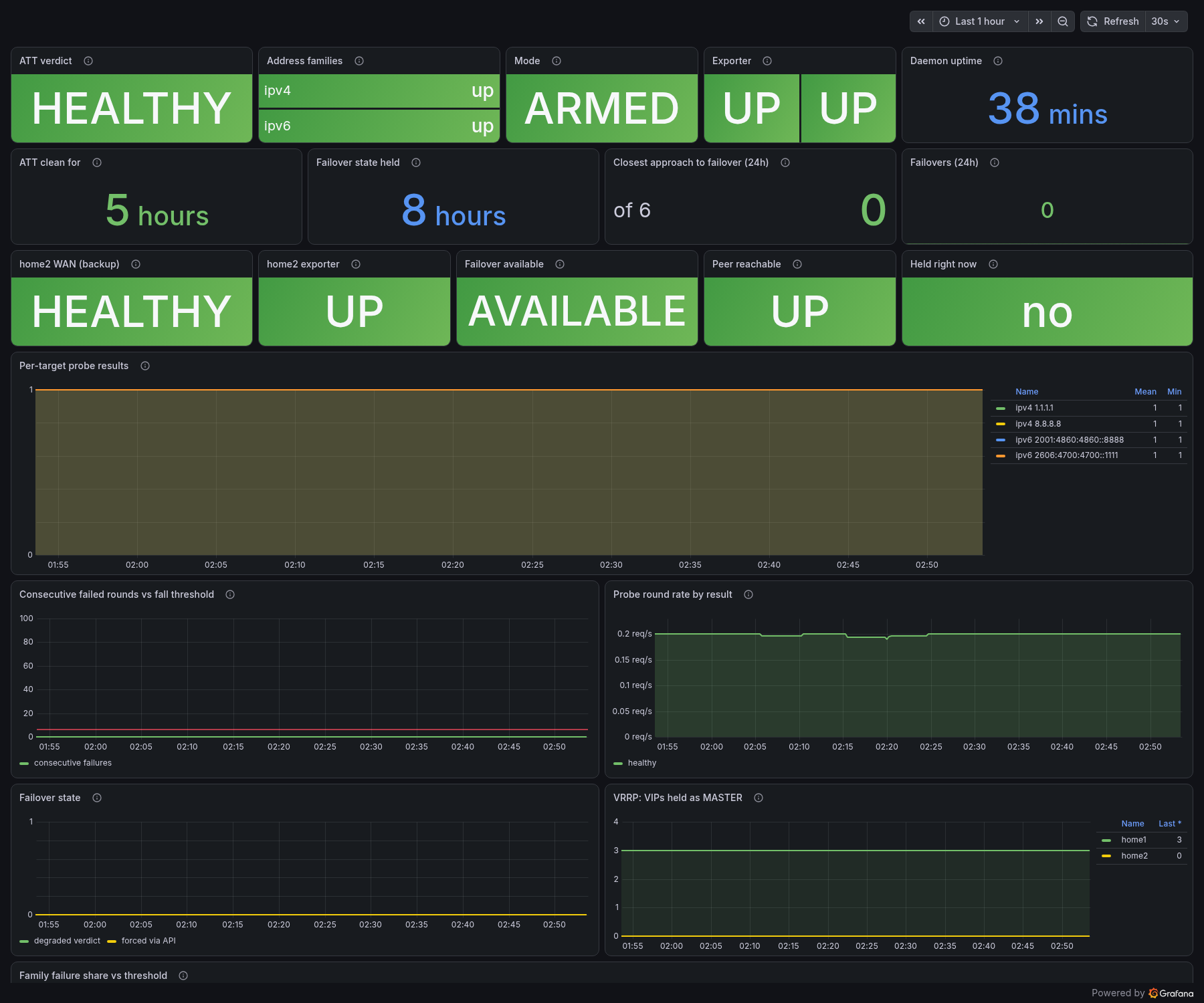
The most important number is not "did it fail over"
The obvious metric is "are we currently failed over". That is the one
everyone adds, and it is the least useful of the set, because by the
time it changes the interesting decision has already been made for you.
The one that matters day to day is Failover available —
could this router fail over if it needed to, right now. That flips to
UNAVAILABLE the instant the backup becomes unusable, long before anything is
attempted. It is the difference between "we are in an incident" and "we have
quietly lost the ability to survive one".
Second most useful is Closest approach to failover — the
worst consecutive-failure streak in 24 hours against the threshold of 6. In
the screenshot it reads 0 of 6, which is the number I wanted before
arming this: proof the probes never got remotely close to a false trip. It is
also the tuning signal. If it sat at 4 or 5, my thresholds would be wrong and
I would know before it bit me rather than after.
Then a few that exist purely to keep me honest:
- Address families broken out separately, because the whole
per-family argument above is invisible on an aggregate. - Mode — ARMED versus DRY-RUN. This one is embarrassing to
need and entirely necessary. It is what stops "I soaked it in dry-run for a
week and forgot to arm it" from being something that can happen quietly. - home2 WAN and home2 exporter, so the
backup's health is visible in its own right rather than only inferable from
the primary's opinion of it. - Per-target probe results, so when something dips I can
tell "one provider is having a moment" from "an entire address family just
went away" at a glance.
The alert I got wrong first
My original alert fired when the WAN was degraded and the backup
was unusable. That is the genuinely bad state, so it seemed like the obvious
thing to page on.
It was useless, for exactly the reason above. A dead backup raised nothing
until the moment failover was attempted and blocked — during an outage. It
would have told me my redundancy had been gone for a week at the precise
moment that information was least actionable.
It now fires on the backup's own verdict alone. When it fires, nothing is
broken for clients: they are on the primary, everything works, and the alert
is telling me the safety net is gone and failover will refuse to happen until
I fix it. That is an alert I can act on over coffee instead of at 2am.
Three alerts total, which feels like the right number:
| alert | fires when | why |
|---|---|---|
WanFailedOverToHome2 |
running on the backup for 5m | you are on the spare tyre |
BackupWANUnhealthy |
the backup's own WAN is degraded | the spare tyre is flat, while you are still driving fine |
WanFailoverFlapping |
more than 2 failovers in an hour | the WAN is unstable rather than cleanly up or down |
There is deliberately no fourth alert for "degraded and held", even
though that is the worst state, because it already surfaces as
BackupWANUnhealthy firing plus the dashboard's Held right
now panel. Inventing a third page for one incident is how alert
fatigue starts.
One more trap worth naming, which I only caught by misreading my own
dashboard. I originally had a single panel showing whether failover was
currently being held. With the backup dead and the primary fine it
read OPEN — implying failover was available when it was in fact
impossible. "Could we fail over" and "are we being prevented from failing over
right now" are different questions, and conflating them produces a panel that
is reassuring at exactly the wrong time. They are two panels now:
Failover available and Held right now.
The rule I would give someone else
If you are building anything whose job is to sit dormant and save you later
— failover, backups, replication, an emergency generator — then the
monitoring is not a follow-up task, it is part of the feature. Ship it
unmonitored and what you have deployed is not redundancy, it is a belief about
redundancy, and those two behave identically until the day they do not.
Where it lives
The daemon is at
github.com/cooperlees/wan_healthcheck.
It is Python, has no dependencies outside PyPI, and needs systemd-networkd and
keepalived to be useful — it flips their switches rather than doing any routing
of its own. The README covers what has to be set up for it to do anything,
which is genuinely the harder half.
The honest summary of the whole exercise: the code was a couple of evenings.
Finding out which parts of it silently didn't work took considerably longer,
and every one of those discoveries came from watching packets rather than
reading logs.
