Archive for 2022

Amazon Link

  • Disclaimer: I get no royalites or anything here - Just had coworkers ask me about it

So since I'm no systems guru and am now working on a Linux Distribution effectively at work I thought I'd read this book. Especially since it relies so heavily on systemd components I wanted to dig deeper and understand more about it's design and why things were done the way they were. So I read this book. I also promised this review to co-workers, so here it is.
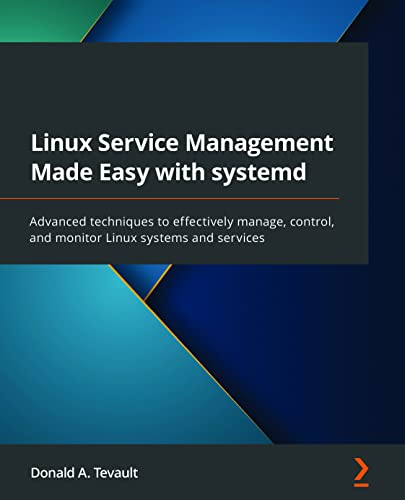
sytstemd book

This book is mainly a walk through of:

  • systemd components
    • Configuration options
  • Differences in RedHats + Cannonicals use of SystemD in their respective distros (Fedora/CentOS + Ubuntu repectively)
    • Examples of how to dig in and play with each implementation
    • Some quirky decisions were made

This walkthrough was handy and there is lots of go read the man page for more info. But the biggest win was all the small pieces that completed little gaps in my systemd knowledge. I also like how the author is an old school Linux admin. So you get a decent explanation of what the systenmd componoent being explained aims to replace. For example, SYS V Init and upstart for main systemd, syslog for journald etc. etc. ...

Overall Rating: 7/10

Why?

Good

  • Explains main configuration in enough detail
  • Good labs to do yourself to understand more + play with more
    • It suggests a Rocky VM + Ubuntu
  • Echo'd a lot why something was done
    • Also stated when the author could not find a good reason for why something was done
  • Explaining cgroups v1 vs. v2 was super handy
  • Showing a distro that used systemd-boot was interesting
    • Who's name elludes me right now (I'm sure arch can use it tho)

Bad

  • Some components were hurried over
    • networkd ... but to be fair networkd is just a layered ini configuration system over netlink ...
    • Some components left me wanting more explanations - But i have a good starting point to go play now
  • The writing style at times, pauses, and makes quirky irrelevant statements
    • But not a big deal
  • Complains about man pages / docs a lot ... Not sure if the author went and fixed them / submitted a PR
    • if they did I apologize - But this is something that grinds my gears

Summary

Anyways - if you're a sysadmin these days. I reccommend reading this to fill in some gaps with systemd + componenets. It's helped me with lots of small things and to understand things I haven't spent enough time with - e.g. cgroups. It even nicely explains why cgroups v2 is so different and how it scales better (I didn't even understand this and I work @ Meta/Facebook).

Do you also write a lot of services that need a few CLI option (e.g. --config) and or little CLI tools from time to time? Want a base CLI + logging to stderr template to start from?

I always do, so I have Python and Rust base CLI code templtes shared on GitHub that I use all the time:

https://github.com/cooperlees/base_clis

I also have sample base GitHub Actions to steal so that you can keep your:

  • Code tested
  • Code formatted
  • Type Checked / compiled
    on commit.

Dependabot will also keep the depdendecies up to date on these templates, so you can rely on them using the latest hotness.

Steal them today and contribute back handy enhancements as you see fit!

Python

Click based, using base logging function with a logging format I love. Logging is usally info or debug.

Rust

clap based, logging with a more standard glog like logging output.

  • -vvv to make it useful logging

IPv4 addressing on links is no longer required to route IPv4. What you say?? Yes, you can stop IPv4 addressing your point to point links with Legacy IP and route your IPv4 addressed packets via IPv6 next hops!

  • With this we can save Public IPv4 addressing!
  • We now only need a Public IPv4 loopback on Internet routers
  • No more wasting valuable IPv4 Public Space
    • with our /31s (or even /30s)
    • Gotta have those network and broadcast addresses ... So my CCNA training says!

MAC address is the same

How does this work??

Routers encapsulate Layer 3 IP packets into a Layer 2 frame on an ethernet networks. Most of the world today uses ethernet. Ethernet routers pull MAC address to send the frame from two sources today:

  • ARP Table for IPv4
  • Neighbor Table for IPv6

Having an IPv4 prefix routed by a IPv6 next hop just tells routers to look in the neighbor table to get the MAC address and no longer use the ARP table during encapsulation. The IP packet is then untouched and encapsulated as it would be using an IPv4 next hop and looks no different to the destination device. This is a truely simplistic, great solution to allow us to continue to routing legacy IP, but not add tech debt addressing our devices with said legacy.

IPv6 Link Local

You can use the auto configured IPv6 Link Local prefixes as your next hops too. IPv6 has the fe80::/10 prefix allocated as a Link Local scoped prefix. This prefix can not be routed. Every IPv6 enabled interface auto configures (by default) a Link Local prefix using it's MAC address to generate a unique address. Due to this, a router can even not have Site or Global scope IPv6 addressing on it's interfaces. Using Link Local addresses it can still be able to route both IPv4 and IPv6. The Terragraph project addresses it's networks like this.

If you do deploy your network this way, I would recommended to have a routable loopback address so you can contact the box inband. This would not be required, but without a routable address it would render traceroutes and pings ineffective for debugging and testing connectivity. All ICMP responses wouldn't be sent by the routers.

Why keep an IPv4 Loopback?

If you'd like ICMP responses, for say traceroute, it's still recommended that you keep a loopback adddress. Most people add /32 addresses to a loopback device on their network devices and doing so here will allow the device to have a source address for the legacy ICMP headers.

Note: I realize you lose what ingress interface you hit on a router without IPv4 p2p addressing

  • I feel this is a small price to pay since I know you're busy IPv6'ing everything ... right?

How do you see an ARP table?

On Linux:

cooper@l33t:~$ arp -an
? (10.251.254.1) at 02:42:0a:fb:fe:14 [ether] on br-a40df68e252d
? (173.255.255.1) at 00:00:0c:9f:f0:05 [ether] on eth0

How do you see a Neighbor Table?

On Linux:

cooper@l33t:~$ ip -6 neighbor
fe80::42:aff:fefb:fe17 dev br-a40df68e252d lladdr 02:42:0a:fb:fe:17 STALE
2600:3c01::8678:acff:fe0d:a641 dev eth0 lladdr 84:78:ac:0d:a6:41 router DELAY

RFCs

  • RFC8950 - "Advertising IPv4 Network Layer Reachability Information (NLRI) with an IPv6 Next Hop"
  • RFC5549 - "Advertising IPv4 Network Layer Reachability Information with an IPv6 Next Hop" (obsolete)

Case Study: Simple Server to Rack

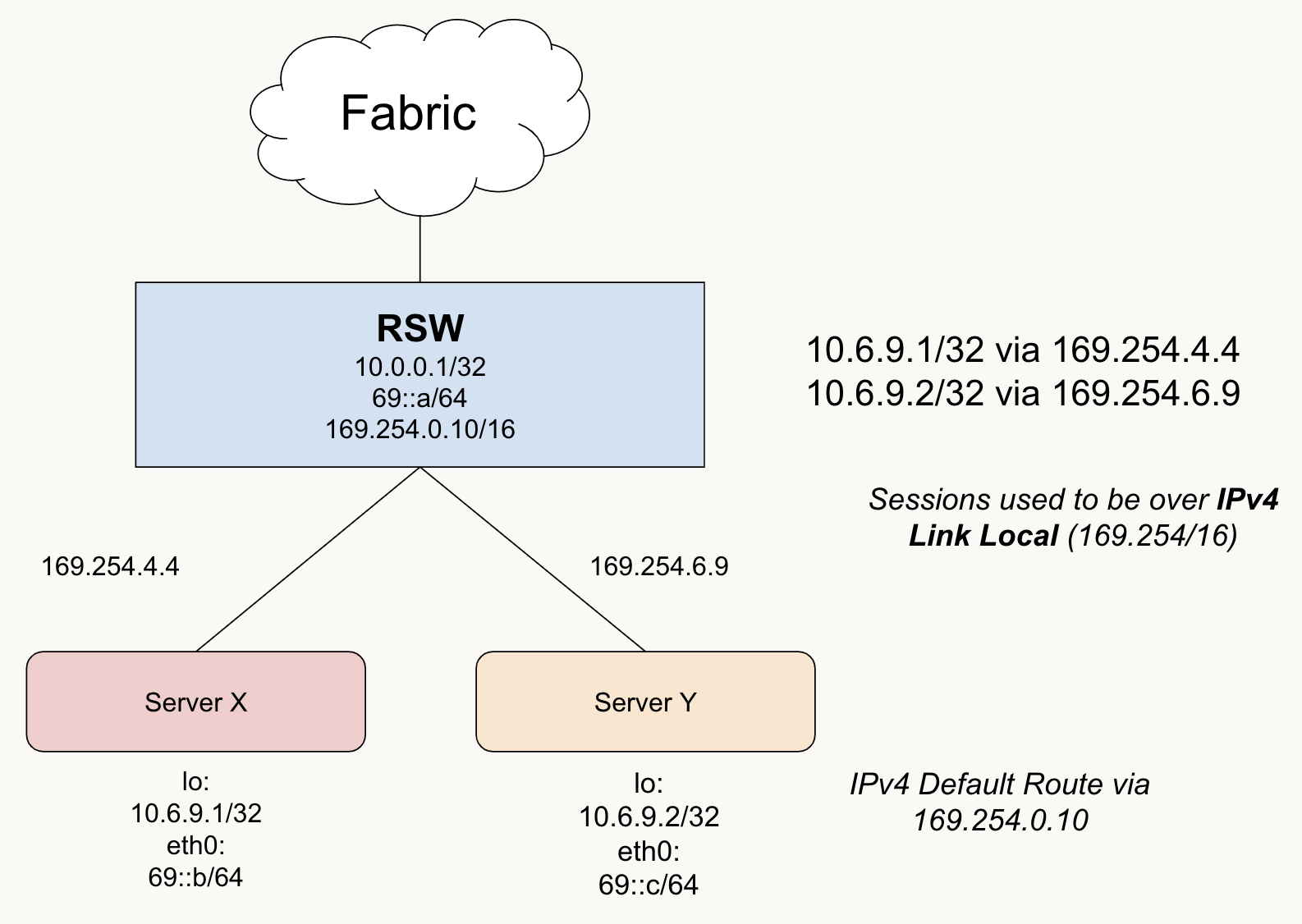
Using IPv4 Next Hops

  • Here we are using IPv4 Link Local in our rack as the next hops
  • The ARP table would be consulted here for looking up the next hop's MAC address
    • e.g. 169.254.6.9

Using IPv6 Next Hops

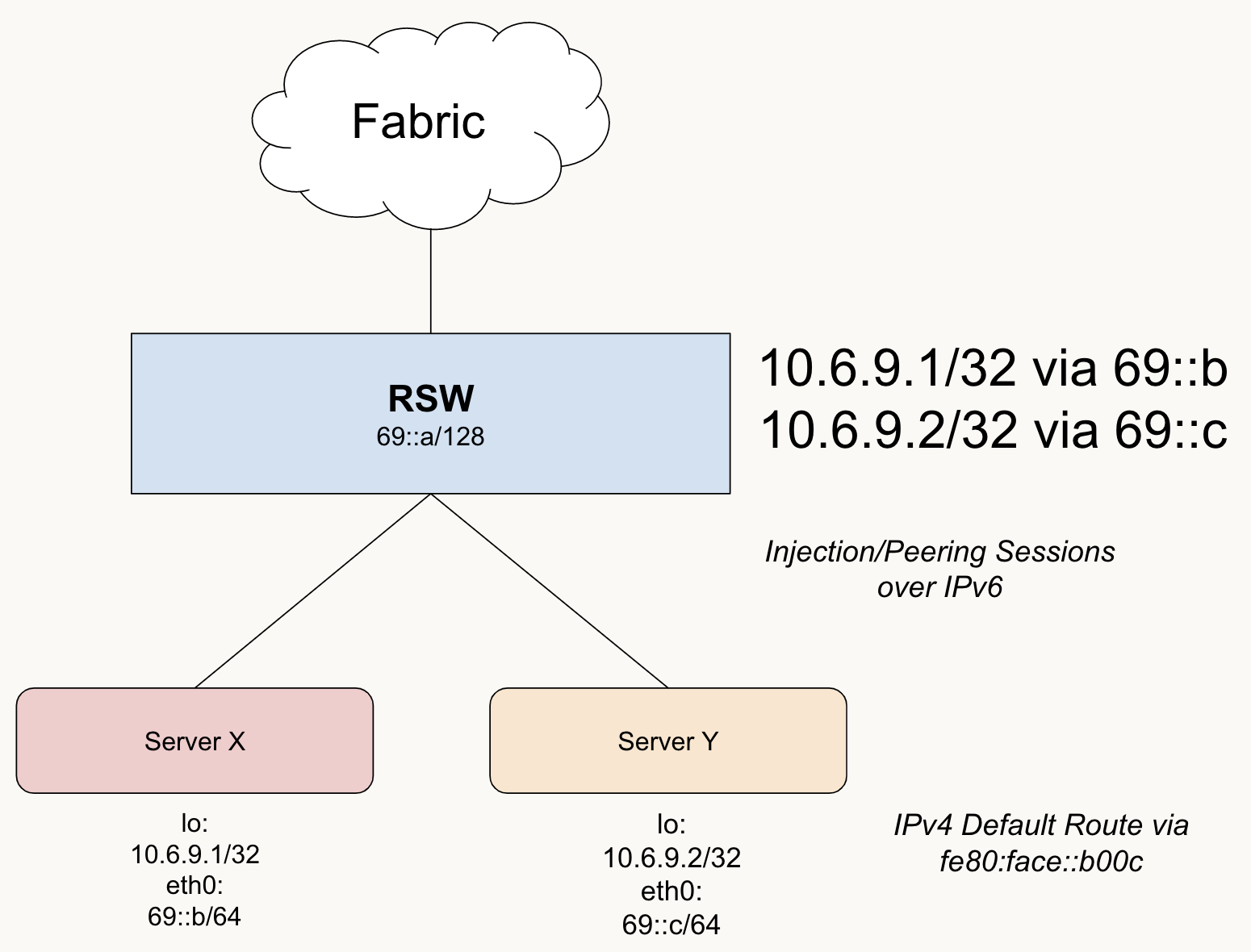
The same rack, but with IPv6 next hops for the IPv4 prefixes.

  • Here we are using IPv6 next hops
  • The Neighbor Table would be consulted to get the MAC address for the L2 Frame encapsulation

OSS Support

  • ExaBGP Support v4 via IPv6: Sample Config

I am sure there are more. Comment away other suggestions and I'll add.

Vendor Support

  • TODO: Finish + add config snippets

Cisco

TBA

EOS

  • We have EOS doing IPv4 via IPv6 @ Meta

TBA

JunOS

TBA